X-Forwarded-For Header: Syntax, Proxy Chains and Safe Parsing
Short answer
X-Forwarded-For (XFF) is a de facto standard HTTP request header that proxies, load balancers and CDNs use to pass on the client’s IP address: each proxy appends the address it received the request from, so the value reads X-Forwarded-For: client, proxy1, proxy2. The left-most entry is whatever the client sent and can be forged, so for security decisions read the list from the right and use the first address that is not one of your own proxies.
On this page
- X-Forwarded-For syntax and examples
- How X-Forwarded-For grows through a chain of proxies
- Which IP in X-Forwarded-For is the client?
- X-Forwarded-Proto, X-Forwarded-Host and X-Real-IP
- The Forwarded header (RFC 7239)
- How proxies, load balancers and CDNs set X-Forwarded-For
- X-Forwarded-For spoofing and how to prevent it
- Log X-Forwarded-For in nginx and Apache
- Read X-Forwarded-For in your code
- Troubleshooting X-Forwarded-For
- Look up the client IP
Behind a reverse proxy, load balancer or CDN, your server’s connection comes from the proxy, so the visitor’s IP address survives only in a header, most often X-Forwarded-For. This reference covers its syntax, how it grows hop by hop, which entry is the client, the related headers, what common proxies do with it, and how to stop spoofing.
X-Forwarded-For syntax and examples
X-Forwarded-For is a request header with a comma-separated list of IP addresses, oldest first:
X-Forwarded-For: <client>, <proxy1>, <proxy2>Each proxy appends the address it received the request from, and the header name is case-insensitive. The forms you meet in practice (all addresses on this page are documentation or private examples):
| Form | Example value | Where it comes from |
|---|---|---|
| One address | 203.0.113.7 | One proxy; the client sent no header |
| A chain | 203.0.113.7, 198.51.100.20, 10.0.1.23 | Several proxies; the last one is not listed |
| No space after commas | 203.0.113.7,198.51.100.20 | Amazon CloudFront, Google Cloud load balancers |
| IPv6 | 2001:db8::7 | Written without brackets |
| Address and port | 203.0.113.7:51234, [2001:db8::7]:51234 | Azure Application Gateway; AWS Application Load Balancer with client port preservation |
| Hidden client | unknown | Squid with forwarded_for off |
| Two header lines | X-Forwarded-For: 192.0.2.1 plus X-Forwarded-For: 203.0.113.7 | HAProxy, which adds its own line after the existing headers |
Parsing rules that follow from this:
- Join repeated lines in order, then split on commas. RFC 9110 allows combining them into one comma-separated list, and MDN warns that reading only one line is not enough. Node.js joins them in
req.headers; Go’sr.Header.Get()and Starlette’srequest.headers.get()return only the first line, which may be the client’s. - Trim spaces and strip ports. A bare IPv6 address contains colons too, so never cut at the last colon.
- Reject entries that are not IP addresses. Google warns that the values in front of the addresses its load balancer appends may contain other characters, including spaces.
- Compare parsed addresses, not strings.
::ffff:203.0.113.7is an IPv4 client on a dual-stack socket, and2001:DB8::7equals2001:db8::7.
How X-Forwarded-For grows through a chain of proxies
A proxy never writes its own address: it appends the address of the connection it received, the previous hop. Here a visitor at 203.0.113.7 reaches a CDN edge, the CDN connects from 198.51.100.20 to your load balancer (10.0.1.23), the load balancer forwards to nginx, and nginx passes the request to the app on the same host:
| Hop | Connection comes from (REMOTE_ADDR) | X-Forwarded-For it sends on |
|---|---|---|
| CDN edge | 203.0.113.7, the visitor | 203.0.113.7 |
| Load balancer | 198.51.100.20, the CDN | 203.0.113.7, 198.51.100.20 |
| nginx | 10.0.1.23, the load balancer | 203.0.113.7, 198.51.100.20, 10.0.1.23 |
| App | 127.0.0.1, nginx | Reads the header nginx sent |
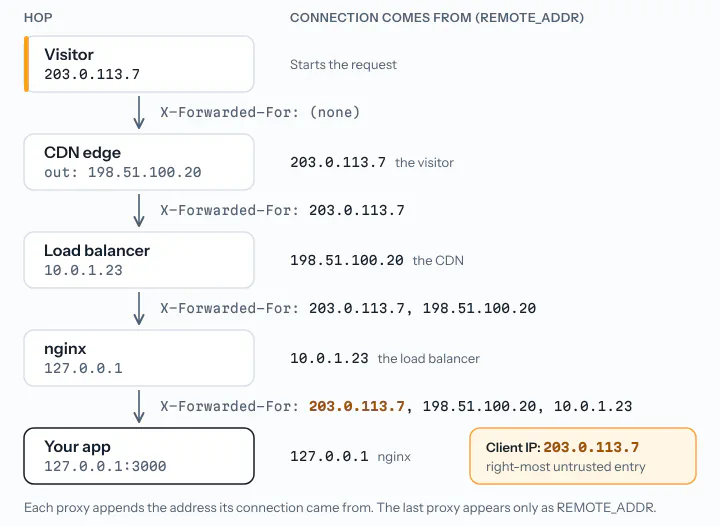
So each proxy adds one entry, and the last proxy appears only as the app’s REMOTE_ADDR. Private addresses on the right, such as 10.0.1.23, are your own internal hops. Google Cloud’s Application Load Balancer is the exception: it appends two addresses at once, <client-ip>,<load-balancer-ip>, so the client is the entry just before the load balancer’s own address.
Which IP in X-Forwarded-For is the client?
Only entries your own proxies wrote are reliable; everything to their left came from the client or from proxies you do not control. First check REMOTE_ADDR: if the connection does not come from one of your proxies, ignore the header. Then use one of the two methods in MDN’s X-Forwarded-For reference, both reading from the right:
- Trusted proxy list. Walk from right to left, skip every address of a proxy you run or pay for, and take the first one that is not. This right-most untrusted address keeps working when the path changes.
- Trusted proxy count. If N proxies append to the header, the client is the Nth entry from the right. This breaks when some requests take a shorter path.
The same chain, with a visitor who forges the header:
curl -H "X-Forwarded-For: 192.0.2.1" https://www.example.com/X-Forwarded-For: 192.0.2.1, 203.0.113.7, 198.51.100.20, 10.0.1.23
REMOTE_ADDR: 127.0.0.1The left-most entry is the forged 192.0.2.1, and the right-most is your own load balancer. With 127.0.0.0/8, 10.0.0.0/8 and the CDN’s ranges (here 198.51.100.0/24) trusted, or with a trusted count of 3, you get 203.0.113.7. That can still be a proxy on the client’s side, such as a company gateway, but it is the first address the client could not choose. The real client IP guide has trusted-proxy settings and complete code for nginx, Apache, Express, Django, Flask, FastAPI, Laravel, Symfony and Go.
Warning
If your app server can be reached directly from the internet, a client can skip your proxies and write the whole header, the right-most entries included. Accept connections only from your proxy or load balancer.
X-Forwarded-Proto, X-Forwarded-Host and X-Real-IP
These companion headers have no specification either, and each is as easy to forge as X-Forwarded-For unless your proxy overwrites it:
| Header | Carries | Notes |
|---|---|---|
| X-Forwarded-Proto | http or https, as used by the client | For redirects and secure cookies when TLS ends at the proxy. Non-standard forms include X-Forwarded-Ssl: on and Front-End-Https: on |
| X-Forwarded-Host | The client’s Host header | Express derives req.hostname from it under trust proxy, so a forged value can reach generated links |
| X-Forwarded-Port | The port the client connected to | AWS Application Load Balancer, Azure Application Gateway |
| X-Real-IP | One client address, not a list | An nginx convention: proxy_set_header X-Real-IP $remote_addr;, read by default by its real IP module. CloudFront removes it |
| Via | The proxies and their HTTP versions | Defined in RFC 9110; no client addresses |
Cloudflare overwrites X-Forwarded-Proto, and Azure Front Door overrides X-Forwarded-Host and X-Forwarded-Proto, yet both append to X-Forwarded-For.
The Forwarded header (RFC 7239)
RFC 7239 standardized the same data in June 2014 as the Forwarded header. Each proxy adds an element of key=value pairs separated by semicolons, and elements are separated by commas:
Forwarded: for=203.0.113.7;proto=https;host=www.example.com
Forwarded: for=203.0.113.7, for=198.51.100.20
Forwarded: for="[2001:db8::7]:4711"
Forwarded: for=_hidden, for=unknown
for is the client or a previous proxy, by the proxy interface that received the request, host the original Host header, and proto the scheme. Rules that break naive parsers:
- IPv6 addresses always stand in brackets, and an IPv6 address or any value with a port must be quoted:
for="[2001:db8::7]",for="203.0.113.7:4711". - A node can be
unknownor an obfuscated identifier that starts with an underscore, such as_hidden. For privacy, RFC 7239 recommends obfuscated identifiers as the default. - Parameter names are case-insensitive.
To convert, prefix each X-Forwarded-For entry with for=: 192.0.2.43, 2001:db8:cafe::17 becomes for=192.0.2.43, for="[2001:db8:cafe::17]". Forwarded fixes the format, not trust: clients can send it too. Support is also narrower. HAProxy adds it with option forwarded, while every load balancer and CDN in the next section documents X-Forwarded-For.
X-Forwarded-For vs Forwarded vs X-Real-IP
| X-Forwarded-For | Forwarded | X-Real-IP | |
|---|---|---|---|
| Specification | None, de facto | RFC 7239 | None, nginx convention |
| Value | One address per hop | for, by, host, proto per hop | One address |
| Through several proxies | Each appends | Each appends an element | Set once, not appended |
| IPv6 | 2001:db8::7 | for="[2001:db8::7]" | 2001:db8::7 |
| Port | Undefined; some add ip:port | Quoted, with the address | Undefined |
| Forgeable | The left part | The left part | Yes, unless your proxy overwrites it |
How proxies, load balancers and CDNs set X-Forwarded-For
Each layer of your stack may append, overwrite or ignore the header, so check every one:
| Proxy or platform | Behavior | Setting |
|---|---|---|
| nginx | Adds nothing; passes the client’s header through | proxy_set_header X-Forwarded-For $proxy_add_x_forwarded_for; |
| Apache httpd (mod_proxy_http) | Appends the client IP; adds X-Forwarded-Host and X-Forwarded-Server | ProxyAddHeaders On (default) |
| HAProxy | Adds its own line with the client IP | option forwardfor, optionally if-none (only when absent) or except <network> |
| Envoy | Appends the peer only with use_remote_address: true; the default false leaves it alone | xff_num_trusted_hops (default 0): right-hand entries to trust |
Go httputil.ReverseProxy | Director appends; Rewrite removes incoming Forwarded and X-Forwarded-* headers | ProxyRequest.SetXForwarded() |
| AWS Application Load Balancer | Appends the client IP; adds X-Forwarded-Proto and X-Forwarded-Port | routing.http.xff_header_processing.mode: append (default), preserve, remove; routing.http.xff_client_port.enabled adds ports |
| Amazon CloudFront | Appends the viewer IP | Removes X-Real-IP and X-Forwarded-Proto sent by viewers |
| Google Cloud Application Load Balancer | Appends <client-ip>,<load-balancer-ip> | Custom header x-forwarded-for:{client_ip_address},{server_ip_address} replaces it |
| Cloudflare | Sets or appends the connecting IP | Recommends CF-Connecting-IP |
| Azure Front Door | Appends the client socket IP | X-Azure-SocketIP holds the TCP peer |
| Azure Application Gateway | Sends IP:port entries | Rewrite with the add_x_forwarded_for_proxy server variable to drop ports |
| Squid | Appends the client IP | forwarded_for: on (default), off (sends unknown), transparent, truncate, delete |
The AWS documentation on X-Forwarded headers compares the three load balancer modes. Load balancers that work at the TCP level add no HTTP headers: they keep the client’s source address or send it in the PROXY protocol.
X-Forwarded-For in nginx
nginx passes client request headers on unchanged (proxy_pass_request_headers is on by default) and adds no X-Forwarded-For itself. Pick the line that fits what sits in front of nginx:
location / {
    proxy_pass http://127.0.0.1:3000;

    # Behind your own CDN or load balancer: keep the chain, append the peer
    proxy_set_header X-Forwarded-For $proxy_add_x_forwarded_for;

    # nginx faces the internet: replace whatever the client sent
    # proxy_set_header X-Forwarded-For $remote_addr;
}
$proxy_add_x_forwarded_for is the incoming header plus $remote_addr, or $remote_addr alone; $http_x_forwarded_for is the incoming header; proxy_set_header X-Forwarded-For ""; removes it. A location inherits proxy_set_header lines only if it defines none, so one new line there drops all inherited ones. To put the client into $remote_addr, use the real IP module (set_real_ip_from, real_ip_header X-Forwarded-For, real_ip_recursive on).
X-Forwarded-For spoofing and how to prevent it
Forging the header takes one curl option, and most proxies keep what the client wrote. What goes wrong:
- Rate limits. Keyed on the left-most entry, each invented value starts a fresh count. Keyed on REMOTE_ADDR behind a proxy, all visitors share one count.
- IP allowlists. An admin area that admits 10.0.0.0/8 by header opens for anyone who sends
X-Forwarded-For: 10.0.0.5. - Log injection. The value is free text. Store only entries that parse as IP addresses, cap the length, and escape the value in dashboards. nginx escapes
",\and bytes below 32 or above 126 as\xXXin access logs by default; your own code may not. - Trust-everything settings. With
trust proxy: true, Express takes the left-most entry, so its documentation requires the last trusted proxy to remove or overwrite X-Forwarded-For, X-Forwarded-Host and X-Forwarded-Proto. - Direct origin access. If clients can reach the app around the proxy, MDN warns that no part of the list is trustworthy.
To prevent it:
- Let only your proxies reach the app: firewall rules, security groups, or binding the app to 127.0.0.1 behind a local nginx.
- At the first proxy you control, overwrite the header unless a trusted CDN sits in front:
proxy_set_header X-Forwarded-For $remote_addr;in nginx,http-request set-header X-Forwarded-For %[src]instead ofoption forwardforin HAProxy,forwarded_for truncatein Squid. - In the app, apply the right-most untrusted rule. Use the left part for statistics at most, never for access, rate limits or fraud decisions.
- Keep trusted ranges current. When a CDN adds ranges you have not listed, its traffic looks as if it came from the CDN itself.
Log X-Forwarded-For in nginx and Apache
Log the trusted client address next to the raw chain. The first says who made the request; the chain shows which proxy reported it and what the client claimed.
# With the real IP module: $remote_addr = client, $realip_remote_addr = connecting proxy
log_format clientchain '$remote_addr peer=$realip_remote_addr xff="$http_x_forwarded_for" '
                       '[$time_local] "$request" $status $body_bytes_sent';
access_log /var/log/nginx/access.log clientchain;
The predefined combined format leaves X-Forwarded-For out, and without the real IP module $remote_addr is your load balancer.
# %a = client after mod_remoteip, %{c}a = connecting proxy
LogFormat "%a peer=%{c}a proxies=%{remoteip-proxy-ip-list}n xff=\"%{X-Forwarded-For}i\" %t \"%r\" %>s %b" clientchain
CustomLog "logs/access_log" clientchain
Apache’s mod_proxy documentation suggests %{X-Forwarded-For}i and warns that it can hold several addresses. After mod_remoteip, the header keeps only the entries left of the client, or disappears when all were trusted; %{remoteip-proxy-ip-list}n lists the proxies it accepted.
Note
IP addresses in logs are usually personal data under the GDPR, whose Recital 30 names them as online identifiers. Keep the full chain only as long as security and debugging need it, and keep just the country or network where that is enough.
Read X-Forwarded-For in your code
Read the header only when REMOTE_ADDR is one of your proxies, and join all header lines before you split them. These short versions show the pattern; the real client IP guide has complete middleware.
Express applies the right-most untrusted rule once trust proxy lists your proxies:
// nginx on this host, load balancers in 10.0.0.0/8, CDN egress (example range)
app.set("trust proxy", ["loopback", "10.0.0.0/8", "198.51.100.0/24"]);

app.get("/debug/ip", (req, res) => {
  // Forged chain from above: ip "203.0.113.7", ips ["203.0.113.7", "198.51.100.20", "10.0.1.23"]
  res.json({ ip: req.ip, ips: req.ips, raw: req.headers["x-forwarded-for"] ?? null });
});
req.ips runs from the client to your nearest proxy, without the forged entries. For Next.js, serverless platforms and Workers, see get the IP address in JavaScript.
Python, with the standard ipaddress module:
import ipaddress

TRUSTED = [ipaddress.ip_network(n) for n in ("127.0.0.0/8", "::1/128", "10.0.0.0/8", "198.51.100.0/24")]


def parse(value):
    ip = ipaddress.ip_address(value.strip())
    return getattr(ip, "ipv4_mapped", None) or ip  # ::ffff:203.0.113.7 -> 203.0.113.7


def is_trusted(ip):
    return any(ip in net for net in TRUSTED)


def client_ip(peer, xff):
    """Right-most X-Forwarded-For address that is not a trusted proxy."""
    ip = parse(peer)
    hops = xff.split(",") if xff else []
    while is_trusted(ip) and hops:
        try:
            ip = parse(hops.pop())
        except ValueError:
            break  # not an IP address: keep the last trusted hop
    return str(ip)


# Django: the WSGI server passes the header as HTTP_X_FORWARDED_FOR
ip = client_ip(request.META["REMOTE_ADDR"], request.META.get("HTTP_X_FORWARDED_FOR", ""))

# Starlette and FastAPI: headers.get() returns only the first line, so join getlist()
xff = ",".join(request.headers.getlist("x-forwarded-for"))
Uvicorn and Werkzeug’s ProxyFix can do this for you; see get the IP address in Python.
PHP:
<?php
// $trusted: exact proxy addresses. Use CIDR matching for ranges (see the real client IP guide).
function client_ip(array $trusted): string
{
    $ip = $_SERVER['REMOTE_ADDR'];
    $hops = explode(',', $_SERVER['HTTP_X_FORWARDED_FOR'] ?? '');
    while (in_array($ip, $trusted, true) && $hops) {
        $hop = trim(array_pop($hops));
        if (filter_var($hop, FILTER_VALIDATE_IP) === false) {
            break;
        }
        $ip = $hop;
    }
    return $ip;
}

$ip = client_ip(['127.0.0.1', '10.0.1.23', '198.51.100.20']);
Laravel’s $request->ip() and Symfony’s getClientIp() do the same once trusted proxies are set, as get the visitor’s IP address in PHP shows.
Go, where r.Header.Values() returns one string per header line:
// r.Header.Get would return only the first line, which may be the client's own
var hops []string
for _, line := range r.Header.Values("X-Forwarded-For") {
	for _, h := range strings.Split(line, ",") {
		hops = append(hops, strings.TrimSpace(h))
	}
}
// Then walk hops from the end while the current address is one of your proxies.
Troubleshooting X-Forwarded-For
| Symptom | Likely cause | Fix |
|---|---|---|
| Header missing | No proxy; nginx without proxy_set_header X-Forwarded-For, or a location that hides inherited lines; a TCP-level load balancer; an AWS load balancer in remove mode | Add it at the proxy, or read the PROXY protocol |
| Only one IP | One proxy, and the client sent no header | Nothing to fix |
| Private IPs in the list | Right: your load balancer, ingress or sidecar. Left: a proxy in the client’s network, or a forged value | Trust your internal ranges; never take a private address from the left part as the client |
| Same IP twice | The nginx real IP module already set $remote_addr to the client, and $proxy_add_x_forwarded_for appends it again | Harmless for the right-most rule; pass X-Real-IP $remote_addr for a single value |
| App sees the proxy’s IP | The app reads REMOTE_ADDR, or the trusted list misses a layer such as the CDN | Trust every proxy layer |
| App sees a forged IP | The code reads the left-most entry or trusts every proxy | Use the right-most untrusted rule |
::ffff: prefix | IPv4 client on a dual-stack socket | Unmap before comparing: ipv4_mapped in Python, netip.Addr.Unmap() in Go |
Port suffix such as :51234 | Azure Application Gateway; AWS client port preservation | Strip ports while parsing |
| Header gone after mod_remoteip | mod_remoteip removes the entries it used | Read REMOTE_ADDR, or log %{remoteip-proxy-ip-list}n |
| Only the first header line arrives | r.Header.Get() in Go, headers.get() in Starlette | Header.Values() or headers.getlist(), then join |
| Not in browser developer tools | Proxies add it after the request leaves the browser | Log it on the server, or echo it from a temporary endpoint |
Look up the client IP
Once you have the right address, the info endpoint of iplookupapi turns it into a country, an ASN and, on the Professional plan and up, VPN and proxy flags (other plans return those fields as null). Call it from your server, with the key in the IPLOOKUPAPI_KEY environment variable:
curl -s "https://api.iplookupapi.com/v1/info?ip=80.110.0.1&fields=ip,location.country.alpha2,connection.asn,connection.organization,security.is_vpn,security.is_proxy" \
  -H "apikey: $IPLOOKUPAPI_KEY"
The response for the sample address from the documentation, trimmed:
{
  "data": {
    "ip": "80.110.0.1",
    "location": { "country": { "alpha2": "AT" } },
    "connection": { "asn": 8412, "organization": "Magenta Telekom GmbH" },
    "security": { "is_vpn": false, "is_proxy": false }
  }
}
For Tor, abuse and threat-score signals, see the IP reputation API. To enrich old logs, send up to 1,000 client addresses per request to the batch IP lookup API.
Frequently asked questions
What is X-Forwarded-For used for?
X-Forwarded-For tells a server which IP address a request came from when it passed through a reverse proxy, load balancer or CDN, because the server’s own connection only shows the proxy. Servers use it for access logs, rate limiting, geolocation, fraud checks and IP-based access rules. Use it for security decisions only after you have checked that the request came through your own proxy.
Can X-Forwarded-For be spoofed?
Yes. Any client can send an X-Forwarded-For header with any value, and most proxies append to it instead of replacing it, so the left part of the list is under the client’s control. Only entries added by your own proxies are reliable: read the list from the right and take the first address that is not one of your proxies. Also block direct access to the app server, or a client can forge the whole header.
What is the difference between X-Forwarded-For and X-Real-IP?
X-Forwarded-For is a list that grows by one address per proxy, so it records the whole path, but its left part can be forged. X-Real-IP holds exactly one address and is an nginx convention: the proxy sets it to the address of the connection it received and replaces any earlier value. Neither header has a specification, and both are trustworthy only when your own proxy sets them.
Why does X-Forwarded-For contain multiple IP addresses?
Each proxy on the way appends the address it received the request from. A request that passed a CDN and a load balancer therefore arrives with two or more entries: the client first, then each proxy except the last one, whose address your server sees as the connection’s source. Extra entries on the left can also come from a proxy on the client’s side or from a forged header.
Is X-Forwarded-For a standard?
No. X-Forwarded-For is a de facto convention without a specification. The standardized equivalent is the Forwarded header from RFC 7239, published in June 2014, which carries client, proxy, host and protocol in one header, for example Forwarded: for=203.0.113.7;proto=https. Forwarded has the same trust problem, and the major load balancers and CDNs still document X-Forwarded-For.
How do I remove the X-Forwarded-For header?
Remove it at the proxy that forwards the request. In nginx, proxy_set_header X-Forwarded-For ""; stops the header from being passed on. In HAProxy, use http-request del-header X-Forwarded-For and leave option forwardfor off; on an AWS Application Load Balancer, set routing.http.xff_header_processing.mode to remove. Your app then sees only the proxy’s address, so log the client IP at the proxy.
Look up IP addresses in your code
iplookupapi returns the location, provider, time zone and security flags of any IP address as JSON. The free plan includes 150 requests a month.
curl "https://api.iplookupapi.com/v1/info?ip=8.8.8.8" \
  -H "apikey: YOUR_API_KEY"