How Accurate Is IP Geolocation? Accuracy by Level, Connection and Radius
Short answer
IP geolocation usually gets the country right: in a 2011 study, databases named the correct country for 96–98% of an ISP’s address blocks. The state or region is less reliable, and the city is often wrong, especially on mobile networks, satellite links, VPNs and privacy relays. The coordinates mark the center of an area that can span many miles, never a street address.
On this page
IP geolocation estimates where an address is used, from registry records, network measurements and the locations providers publish, compiled into GeoIP databases. It’s reliable for the country, weaker for the state and a rough estimate for the city. Below are the measured numbers, how your connection shifts them, what an accuracy radius means, and how to test and fix a wrong location. For the basics, see how IP geolocation works.
How accurate is IP geolocation at each level?
Accuracy drops each time you zoom in. Vendor accuracy claims are left out, because researchers noted in 2011 that they are hard to verify.
| Level | How reliable | Why it gets harder |
|---|---|---|
| Country | Right for the large majority of addresses | Each block has a registered country, and most blocks are used there. |
| State or region | Usually right on home broadband, less so on mobile data | A provider’s regional hub or gateway can sit across a state line. |
| City | Often off, by a few miles or a whole state | The data must know which local network serves each block, and blocks move. |
| Postal code | The weakest level; treat it as a guess | The geofeed standard deprecates postal codes, so databases infer them. |
| Coordinates | The center of the matched area | One point stands for a city, region or country, never a building. |
What studies found:
- Country and city (2011): Poese and colleagues compared five databases with location data from a large European ISP (ACM SIGCOMM Computer Communication Review). The databases named the right country for 96–98% of the ISP’s address blocks, but in two of them fewer than 20% of exact matches were within a few tens of kilometers. Their verdict: databases “can claim country-level accuracy, but certainly not city-level.”
- Fixed broadband vs. mobile (2022): Saxon and Feamster checked two databases against smartphone GPS positions in New York, Chicago and Philadelphia from 2020 and 2021. On fixed broadband, median errors were 2.6–4.3 km (1.6–2.7 miles) for one database and 12–24 km (7–15 miles) for the other. For one large cable provider in New York, about two-thirds of locations fell within 10 km (6 miles); for one major mobile carrier, only 18% did.
- Self-published locations (2026): A check of operators’ own location feeds, presented at the NANOG 96 operators’ meeting, found 92% country-level consistency (96.6% for IPv4, 79.6% for IPv6) and 79.6% city-level accuracy. On mobile networks, the figures fell to 84.5% and 29.9%.
Note
The studies used different addresses, countries and years, so their numbers don’t combine into one figure. The pattern holds: the country is reliable, the city isn’t, and mobile is hardest.
How accurate is IP address location by connection type?
Your IP address shows where your traffic enters the internet. Your connection decides how far that is from you.
| Connection | Where the IP places you | What to expect |
|---|---|---|
| Home broadband (cable, DSL, fiber) | Your provider’s local or regional network | Country and state usually right; city often right in large metro areas |
| Mobile data (4G, 5G) | The carrier’s gateway for a large region | City often wrong; many customers can share one address (carrier-grade NAT) |
| Satellite | The provider’s ground station or internet exit point | Can be hundreds of miles away, even across a border |
| Work network or corporate VPN | The company’s exit point, such as headquarters or a cloud security service | Often another city, sometimes another country |
| Cloud and hosting | The data center or the provider’s registered address | Shows where a server runs, not where a person is |
| VPN, proxy or Tor | The exit server | Any country the service offers |
| iCloud Private Relay | A shared relay address for your area | Coarse city level by default; only country and time zone with the broader setting |
| Roaming abroad | Often your home carrier’s network | Usually your home country |
Mobile data is a common reason a phone shows the wrong city. Carriers route data through gateways that each serve a large area, and carrier-grade NAT puts many customers behind one public address. A 2009 study of 3G networks found that phone addresses carry little useful geographic information and can change within minutes.
iCloud Private Relay gives Safari a relay address that, according to Apple, “accurately represents the client’s coarse city-level location by default.” With the broader setting, the address can come from anywhere in the user’s country and time zone. Several users in the same area can share one relay address, so Apple advises sites to treat these addresses like carrier-grade NAT addresses. They also rotate over time.
Why is my IP address location wrong?
- Registration isn’t usage. Registry records (whois and RDAP) show where a block’s holder is registered, not where its addresses are used. In a 2011 study, Shavitt and Zilberman found one database placing 253 of 266 addresses of one ISP in the company’s headquarters city.
- Blocks change hands. Providers reassign, sell and lease address blocks, and databases catch up later. A 2020 study traced errors to blocks moved in a merger, and the NANOG 96 analysis named IP leasing services among the top sources of mismatches.
- Networks span countries. Databases tend to mislocate addresses of networks with a global presence, Livadariu and colleagues found in 2020. In two international networks, they mislocated about half of the addresses examined.
- IPv6 is located less reliably. In that 2020 study, the sources disagreed on the country for 8% of IPv6 addresses versus 5% of IPv4 addresses. Your IPv4 and IPv6 addresses can map to different places.
- Anycast. Public DNS resolvers and CDNs announce one address from many locations, so no single location fits it.
- Missing or wrong geofeeds. A 2024 study in the Proceedings of the ACM on Networking found that self-published feeds covered only a small share of allocated IPv4 and IPv6 prefixes, and some contained errors.
- VPNs, proxies, Tor and relays. The lookup locates the service, not you.
- The wrong address was looked up. Behind a load balancer, CDN or reverse proxy, a server may look up the proxy’s address instead of the visitor’s.
What the accuracy radius means
The coordinates in an IP lookup mark the center of the matched area: a city center, or the middle of a region or country when that’s all the data knows. They never point to a home (see what an IP address tells you). An accuracy radius says how far from that point the address may be, at a stated confidence level. Browsers describe device location the same way: the W3C Geolocation API reports accuracy as a radius in meters at 95% confidence. IP-based radii are given in kilometers.
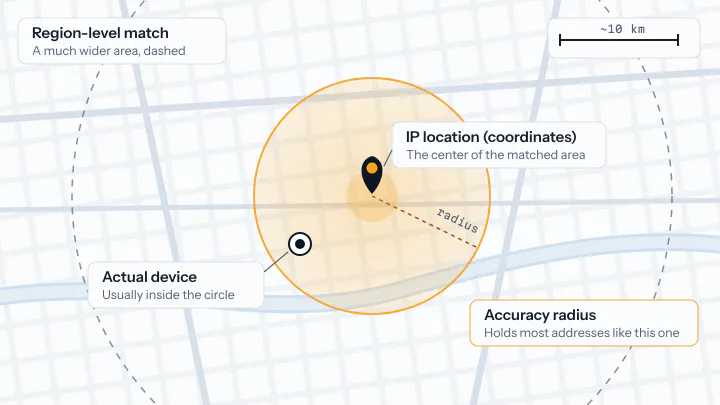
How to use a radius:
- Draw a circle, not a street-level pin.
- If the radius is larger than the city, act on the region or country instead.
- Match the radius to the decision. A 25 km (15-mile) radius is fine for local weather, not for deciding which county someone is in.
- Compare confidence levels. A radius at 80% confidence and one at 95% aren’t directly comparable.
- Without a radius, assume the error can be as large as the matched city, state or country.
How to test IP geolocation accuracy yourself
To check your own connection:
- Turn off any VPN, proxy and iCloud Private Relay.
- Open where am I on your home Wi-Fi and note how far the city it shows is from your real location.
- Switch your phone to mobile data, reload the page and compare.
- Check the same address with a second lookup source. If the two disagree by more than their radius, treat the city as unknown.
To measure accuracy at scale:
- Collect addresses whose location you know for certain: your offices, test devices on different networks, and users who agreed to share their city.
- Look up the whole set and score each level: right country, right state or region, city within 25 km (15 miles), and the median distance error.
- Split the results by connection type and by IPv4 and IPv6.
- Repeat every month or two, because address assignments and databases change.
How to fix a wrong IP location
If your IP shows the wrong place
- Turn off any VPN, proxy or Private Relay, and check whether the wrong place shows on Wi-Fi, mobile data or both.
- Ask your ISP to correct your address block’s location, for example in its geofeed.
- Report your IP address and real city to the service that shows the wrong place. For iplookupapi’s data, use the contact page.
- For one website, such as a streaming service, set your location in that site or allow location access in your browser.
- Allow time. Each database and website refreshes on its own schedule.
If you run the network: publish a geofeed
A geofeed is a CSV file in which a network operator states where its prefixes are used. Published feeds grew from about 400 in 2020 to over 3,300 in 2025, according to the NANOG 96 analysis. Databases may treat a feed “as a hint only,” so keep it consistent with your registry data.
- List each prefix with its country (ISO 3166-1 alpha-2), region (ISO 3166-2) and city, in the RFC 8805 format. A line looks like
192.0.2.5,US,US-AL,Alabaster,. Leave the last field, the postal code, empty: the RFC deprecates it. - Publish the file at a stable HTTPS URL.
- Point to the file from each block’s registry record, as RFC 9632 describes: a
geofeed:attribute on the inetnum or inet6num object, or aremarks: Geofeedline with the URL where the registry lacks that attribute. You can sign the file with your RPKI certificate; RFC 9877 (2025) adds the link to RDAP. - Update the file whenever you move or reassign a block. Both RFCs point readers to a weekly refresh, so allow a week or more.
- After a few weeks, look up addresses from each changed prefix and send what’s still wrong to the database providers, with your geofeed URL.
How developers should use IP location
- Decide on the country. It’s the level the studies support. Fall back to a neutral default when there’s no data.
- Treat the city as a suggestion. Pre-fill a city or store picker, let users change it, and remember their choice.
- Check precision and radius first. Show a city only when the match is at city level and the radius fits your use case.
- Never block on the city. You’d lock out mobile, satellite and relay users by mistake. Where rules require a location check, add a stronger signal, such as the billing address or the device location with permission.
- Look up the right address. Behind a proxy or CDN, use the real client IP from the header your proxy sets.
- Store the lookup time. Save the IP, the result and the date, and look up again when the IP changes or the result gets old.
Every iplookupapi /v1/info answer includes location.precision (city, region, country or null; paid plans add coarse for mobile, carrier-grade NAT, satellite and relay networks), location.accuracy_radius_km (the radius holding 80% of the addresses in comparable answers) and location.confidence (the share of those within 50 km). This Node.js example shows the city only when it’s precise enough, and otherwise the region or the country:
// Node.js 18+. Run: IPLOOKUPAPI_KEY=your_key node place.js <ip> (no ip: your own address)
const KEY = process.env.IPLOOKUPAPI_KEY;
if (!KEY) throw new Error("Set the IPLOOKUPAPI_KEY environment variable");

const FIELDS = [
  "location.country.alpha2",
  "location.country.name",
  "location.region.name",
  "location.city.name",
  "location.precision",
  "location.accuracy_radius_km",
].join(",");

async function placeFor(ip, maxRadiusKm = 25) {
  const url = new URL("https://api.iplookupapi.com/v1/info");
  if (ip) url.searchParams.set("ip", ip); // without ip: the caller's own address
  url.searchParams.set("fields", FIELDS);

  const res = await fetch(url, { headers: { apikey: KEY } });
  if (!res.ok) return { level: "unknown", name: null, country: null };

  const loc = (await res.json()).data?.location ?? {};
  const country = loc.country?.alpha2 ?? null;
  const radius = loc.accuracy_radius_km;

  if (loc.precision === "city" && radius != null && radius <= maxRadiusKm) {
    return { level: "city", name: loc.city?.name ?? null, country };
  }
  if (["city", "region"].includes(loc.precision) && loc.region?.name) {
    return { level: "region", name: loc.region.name, country };
  }
  if (country) return { level: "country", name: loc.country.name ?? null, country };
  return { level: "unknown", name: null, country: null };
}

placeFor(process.argv[2]).then(console.log);
Frequently asked questions
Why is my IP address location wrong?
Your IP address shows where your provider’s network meets the internet, not where your device is. The place is often wrong because the provider routes traffic through a hub in another city, the address block was recently moved or sold, or a VPN, proxy or iCloud Private Relay replaced your address. Turn those services off and check again, then ask your ISP to correct the location of its address block.
Why is my IP address location wrong on my phone?
On mobile data, your carrier sends traffic through gateways that each serve a large region and often puts many customers behind one shared address, so the city is often wrong. In a study by University of Chicago researchers with GPS data from 2020 and 2021, only 18% of one major US carrier’s phones were placed within 10 km (6 miles) of their real position. On Wi-Fi, your phone uses your home connection’s address, which usually maps closer.
Does everyone in my house have the same IP address?
For IPv4, yes: your router shares one public IPv4 address among all devices at home, so websites see the same address and the same location for each of them. Each device also has its own local address, such as 192.168.1.20, which only works inside your network. With IPv6, each device usually gets its own public address, but all of them share your connection’s prefix and normally map to the same place.
How do I find my public IP address?
Open the where am I page, which shows the public IP address that websites see and where that address places you. Your device’s network settings usually show only its local address, such as 192.168.1.20, which is not the one websites see. On a phone, the public address changes when you switch between Wi-Fi and mobile data.
Can an IP address show my exact location?
No. IP geolocation estimates an area, usually a city or region, and its coordinates mark the center of that area, not your street or building. Your internet provider knows which customer an address was assigned to, but geolocation databases don’t. A website gets your precise position only if you allow location access in your browser or app.
Why does Google have the wrong location for my IP?
When you don’t share your device location, Google can estimate your area from your IP address, which may point to your provider’s hub instead of your town. The bottom of a Google results page shows the location Google used and where it came from. To fix it, allow location access for google.com in your browser, or turn off a VPN or proxy that moves your IP location.
Look up IP addresses in your code
iplookupapi returns the location, provider, time zone and security flags of any IP address as JSON. The free plan includes 150 requests a month.
curl "https://api.iplookupapi.com/v1/info?ip=8.8.8.8" \
  -H "apikey: YOUR_API_KEY"